

How to close a checkout for a key that won't come back
In short: When a checked-out key set is never coming back, whether it’s been lost, handed over for good, or retired, you close its checkout as won’t be returned. You pick a reason, and Keyhive deletes the key set and frees its fob for reuse, while keeping the full history. This is a portal action.
When you’d do this: A key set is gone and isn’t coming back, whether someone’s lost it, you’ve handed it over permanently, or it’s been retired or destroyed, and its checkout is still open and needs closing.
Before you start
- This isn’t a return. A return is for a key that’s physically back with you; it goes back on the shelf, ready to go out again. “Won’t be returned” is the opposite: it deletes the key set, because it no longer exists in your world. Using Mark as returned instead would put a key you’ll never see back on your available list. See How to return a key.
- It’s permanent. Deleting a key set this way is not the same as archiving (which is reversible). Use it only when the key set really is gone for good.
- Anyone can do it. Closing a checkout, whether as returned or as won’t-be-returned, is open to everyone, whatever their role. The option is there as long as the key set is still out.
Closing the checkout
You can do this from two places, whichever you’re already looking at:
- the key set’s page, in its active checkout section, or
- the checkout’s own page.
On both, the action lives in the actions menu: the vertical dots (⋮).
-
Open the actions menu. On the key set or checkout page, click the actions icon (⋮) and choose Won’t be returned.
-
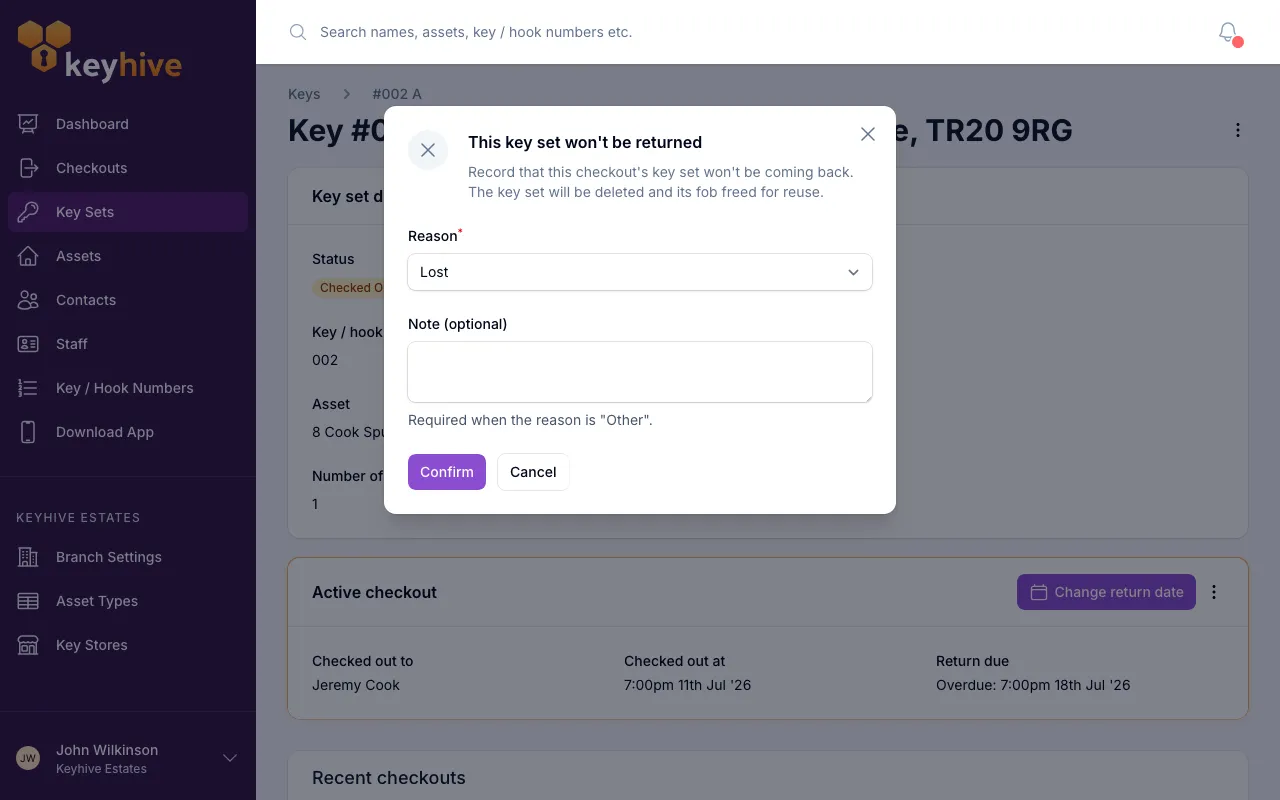
Pick a reason. A short form appears headed “This key set won’t be returned”. Choose the reason the key isn’t coming back:
- Lost. It’s gone missing and can’t be found.
- Handed over. You’ve given it away for good (for example, ownership has passed to someone else).
- Decommissioned. It’s been retired or destroyed.
- Other. Anything that doesn’t fit the above.
-
Add a note if it helps. There’s an optional note field to record what happened. It’s required if you pick “Other”, so there’s always a record of why, and a good idea for the others too.
-
Confirm. Click Confirm. The checkout is closed, the key set is deleted, and its fob is freed for reuse straight away.
What happens afterwards
- The key set is deleted and drops off your available-key list, so it stops showing up as if it were ready to go out.
- Its fob is freed the moment you confirm, ready to put on another key set.
- The history stays intact. The checkout, who last held the key, and the reason you gave are all kept as a record; nothing about the past is lost, even though the key set itself is gone.
Good to know
- Only for keys that are genuinely gone. If a key set is simply back with you, return it instead. If you just want it out of everyday sight but might want it back, archive it rather than deleting it here.
- The reason is on the record. The reason you pick (and any note) is saved against the closed checkout, so anyone reviewing later can see exactly why the key set was written off.
- This is a portal-only action. You can’t mark a key as won’t-be-returned on the Hive or mobile app, since those handle keys physically coming and going. A key that’s gone for good is closed out in the portal.