

What is Keyhive?
In short: Keyhive keeps track of your physical keys: who has them, where they are, and when they’re due back. Every set of keys carries a small electronic fob. You tap the fob to hand keys over, tap it again when they come back, and Keyhive records both.
When it matters: You’re new to Keyhive and want the shape of it before you start.
What it’s for
Keys go missing. Someone goes to the cupboard, the set isn’t on its hook, and there’s no way to tell who took it or when. Keyhive gives every key set either a place it’s sitting or a person it’s with, a date it’s expected back, and a history of everyone who has held it.
The everyday loop
Almost everything you’ll do is one of three things:
- Keys go out. Tap the fob, choose who’s taking them, set when they’re due back, and they sign on screen. A few seconds. See How to check out a key.
- Keys are out. The set shows as checked out to that person, due back on that date. If the date passes, Keyhive chases them for you. See How to see which keys are out right now.
- Keys come back. Tap the fob, confirm the return, and the set is available again. See How to return a key.
How your keys are organised
- Asset: the thing the keys open. A property, a vehicle, a unit, a cabinet: the categories are yours to define.
- Key set: the bunch of keys on one ring, belonging to one asset. This is what you check out, not individual keys. An asset can have several: a spare, one for contractors, one for the office.
- Fob: the electronic tag on the ring. Tapping it is how Keyhive knows which key set you mean. One fob, one key set, and a fob can be moved to another set later.
- Staff and contacts: who keys go out to. Staff are your own team; contacts are everyone else, and you can add one mid-handover if they’re not in Keyhive yet.
- Key / hook number: optional. The hook, peg or drawer a set hangs on, so you know where in the room to walk.
Where you use it
-
The Hive: a tabletop unit kept wherever you manage keys. Tap a fob on it and it walks you through the whole handover, signature included. Most day-to-day key movements happen here.
-
The mobile app: the same handovers on a phone, for when you’re away from the Hive, or the keys are.
-
The web portal: the full picture on a computer. Everything the Hive and the app record shows up here, along with everything they can’t do: adding assets and key sets, importing lists, exporting spreadsheets, managing staff, and searching your whole history.
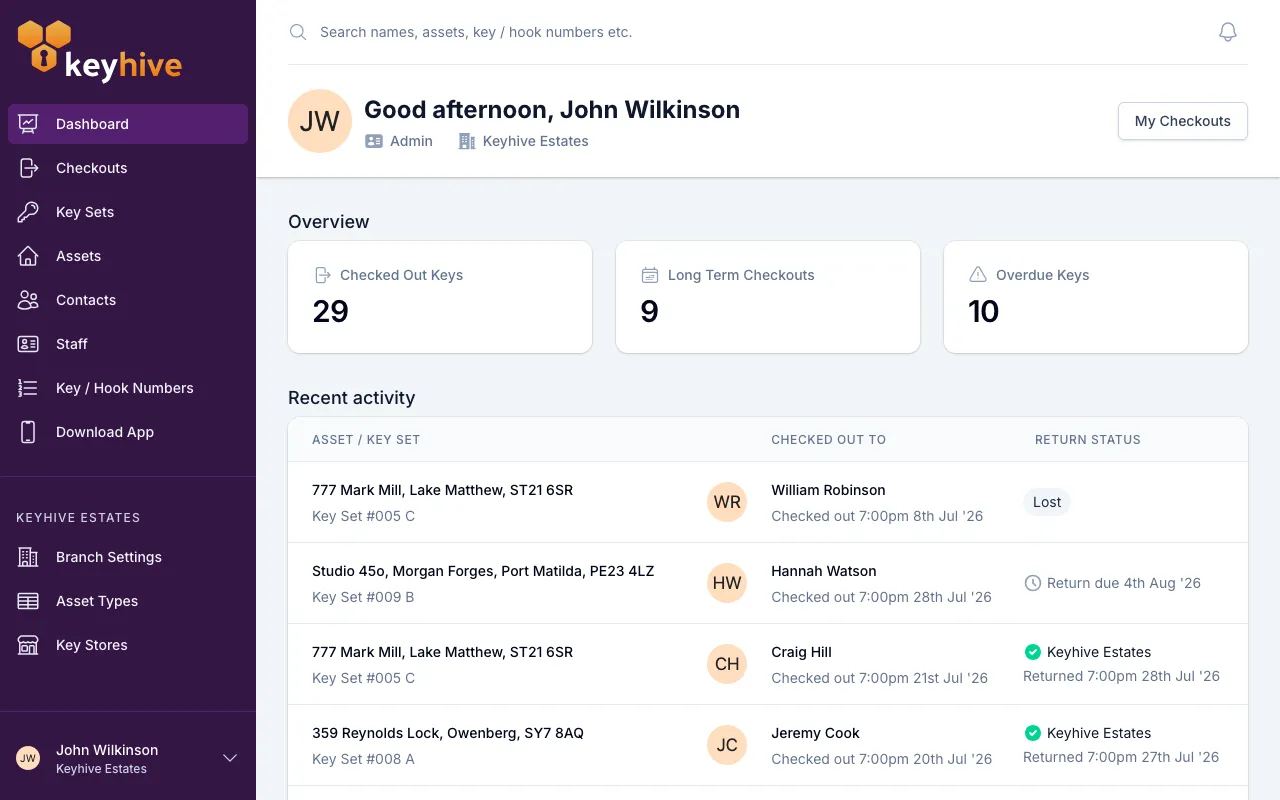
You and your team share one Keyhive account across all three. The portal and the mobile app use your own personal login; the Hive is signed in once with a shared Hive username and password and left running.
What Keyhive does on its own
- Chases late keys. When a key set passes its return date, Keyhive emails or texts the person holding it on the first weekday morning it’s late, and again each Monday it’s still out. Nothing is sent when keys go out, only when they’re late or a return date moves.
- Keeps the record. Every handover, return, photo and signature stays attached to the key set and to the person, so “who had this in March” is a search, not a memory test.
Good to know
- A key set always belongs to an asset. Create the asset first, then its key sets. See How to create an asset.
- It isn’t only for properties. Anything with keys works, including vehicles, plant, storage and cabinets, and you name the categories yourself. See How to manage asset types.
- Photos are optional but useful. A picture of the keys as they go out settles what was handed over and what state it was in. See How to add a photo of a key set.
- If your keys live in more than one place, such as an office and a van, or two offices, key stores track which one each set is sitting in. They aren’t switched on for every account. See Understanding key stores.
- If you run more than one branch, Keyhive shows you one at a time and keeps their records separate. See Working across more than one branch.
- If your assets and contacts already live in another system, Keyhive can pull them across so you’re not typing them in twice. We connect to Apex27, iamproperty, Reapit, SME Professional and Street.co.uk. Ask us to set it up.