

Understanding key / hook numbers
In short: A key / hook number is a short, reusable reference, such as 001, 52 or 624, written on the hook, peg, drawer or slot where a set of keys is kept. You give the number to an asset, and every key set for that asset inherits it. When the asset is finished with, the number is freed and can be given to the next one, and Keyhive shows you, at any moment, exactly which numbers are free.
When you’d do this: If your keys hang on a board, sit in numbered drawers, or live on labelled pegs, key / hook numbers are how you tell Keyhive where each key set physically sits, so anyone can walk up and put their hand on the right keys, and so you can see at a glance which hooks are still free.
Key / hook numbers are optional. If your keys aren’t organised by numbered hooks or slots, you can ignore them entirely and nothing else in Keyhive changes. People say both “key number” and “hook number”. They’re the same thing.
The problem they solve
When something new arrives and you need a hook for its keys, you need to know which hooks are free.
Without numbers, the only way to check is to walk to the board and look for a gap, and what you see there can mislead you. Keys hanging on a hook might belong to something you finished with months ago, and an empty hook might be empty because someone has those keys out today.
Key / hook numbers give you the answer as a list instead. Keyhive tracks which numbers are attached to something and which aren’t, so you can see the free ones without leaving your desk. See Available and in use below.
How it fits together
The number → the asset → its key sets.
- The number is the physical spot: hook 52, drawer 001, peg 17. It exists on its own, before it means anything.
- You assign it to an asset, the thing your keys open. From that moment, hook 52 is where that asset’s keys live.
- The asset’s key sets inherit it. Every key set for that asset carries the number, because they all hang in the same place.
So the number answers “where are the keys?”, and the asset answers “what do they open?”.
Naming: the number plus a set identifier
Most assets have more than one set of keys: one for the office, one for a contractor, a spare. They all hang on the same hook, so they all share the same number. What tells them apart is a short set identifier you add to each one:
- Letters. Number 52 with the identifiers A, B and C gives you key sets called 52A, 52B and 52C.
- Words. Number 624 with the identifiers Office, Spare and Contractor gives you 624 Office, 624 Spare and 624 Contractor.
- Colours. Number 17 with the identifiers Red, Green and Yellow gives you 17 Red, 17 Green and 17 Yellow.
Any of these styles works. It’s what people will read off the label when they’re looking for the right set.
Keep the identifier out of the number itself. The number is just
52, not52A. Keyhive adds the set identifier when it names each key set, so putting it in the number too gives you key sets called “52AA”. You’ll see the same reminder on the form when you create one.
See How to create a key / hook number and How to assign a key / hook number to an asset.
Available and in use
Every number is in one of two states, and Keyhive keeps track for you.
- Available. The number isn’t attached to any asset. It’s a free hook, waiting for its next one.
- In use. The number is attached to an asset, and that asset’s key sets hang on it.
You’ll find both, with a running count, on the Key / Hook Numbers page in the portal: tabs for All, Available and In use.
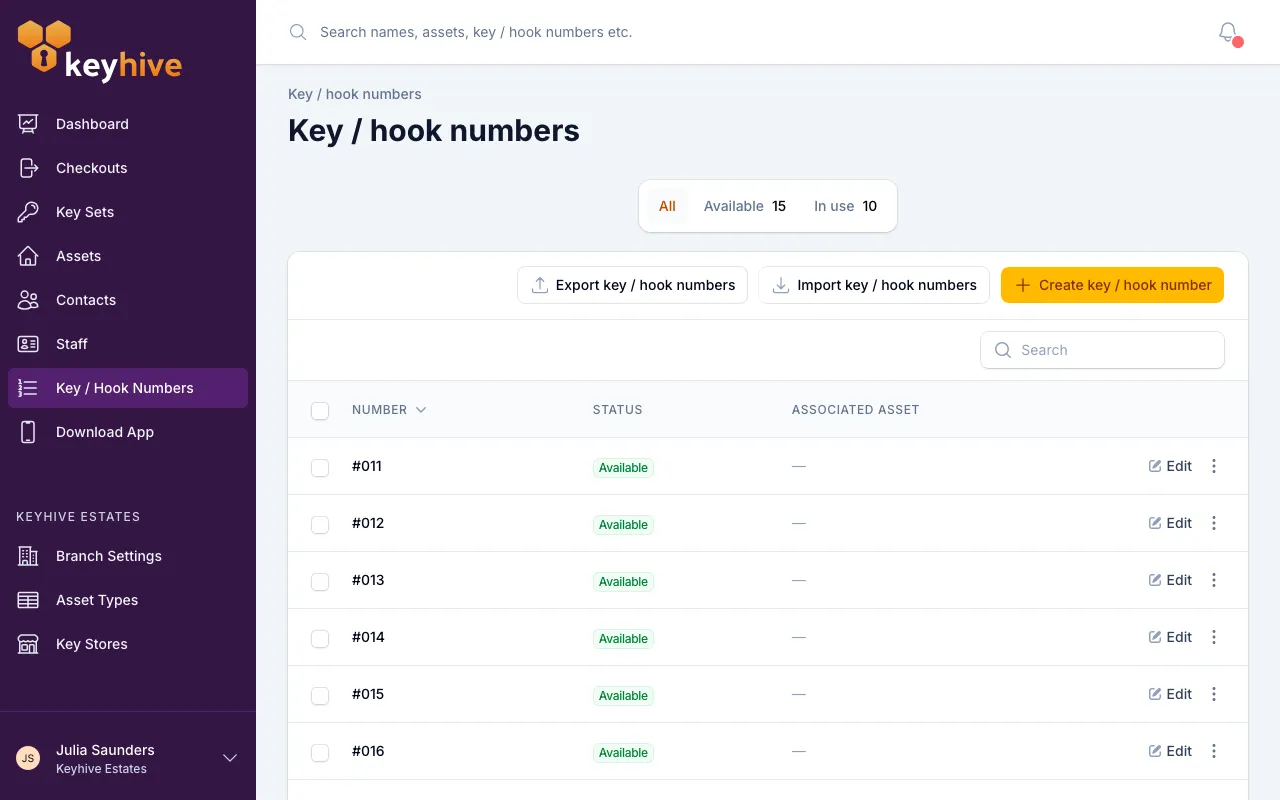
Why it matters: when something new comes in, the Available tab tells you which hooks are free without walking to the board to look.
A key set being checked out doesn’t make its number available. The keys are out with someone, but the hook still belongs to that asset and the keys will come back to it.
See How to view available key / hook numbers.
Numbers are reused, not used up
When you archive an asset, its number is released and goes straight back to Available. The hook is empty again, so the next asset can have it. Nothing is deleted and no history is lost; the number simply returns to the pool.
So a key / hook number isn’t a permanent name for an asset. It records where the keys are kept now, and the same hook 52 will hold the keys to different things over the years.
Good to know
- A number belongs to one asset at a time. Two assets can’t share a hook number, so if their keys currently hang together, give the second one its own hook.
- An asset can have more than one number. Useful when an asset has enough key sets to spill over onto a second hook or drawer.
- Moving a number to a different asset unassigns key sets. If you reassign a number that’s in use, any key sets sitting on it lose it. Those keys aren’t on that hook any more. The old asset’s key sets will need a number of their own.
- You can’t delete a number that’s in use. Unassign it from its asset first, then delete. Deleting is permanent, but you’ll rarely want to, since an unused number just sits in Available costing nothing.
- Deleting needs Manager or Admin access. Anyone can add a number, assign one or unassign it; only those roles can delete one.
- Numbers don’t affect checking keys out. A key set with no number checks out, returns and gets a fob exactly like any other. The number only helps you find it.
- You don’t have to type them in one at a time. If you already have a numbered board, import the whole list from a spreadsheet in one go. See How to import key / hook numbers from a spreadsheet.
Related
- How to label and organise your keys
- How to create a key / hook number
- How to view available key / hook numbers
- How to assign a key / hook number to an asset
- How to bulk assign key / hook numbers to assets
- How to import key / hook numbers from a spreadsheet
- How to export key / hook numbers to a spreadsheet
- Glossary: Key / hook number
- Glossary: Key set